Home / From registration to a report you can use
From registration to a report you can use
A VIN request should begin with the right vehicle. VIN Reveal separates the registration lookup from the paid report so you can check the description before deciding whether to continue.
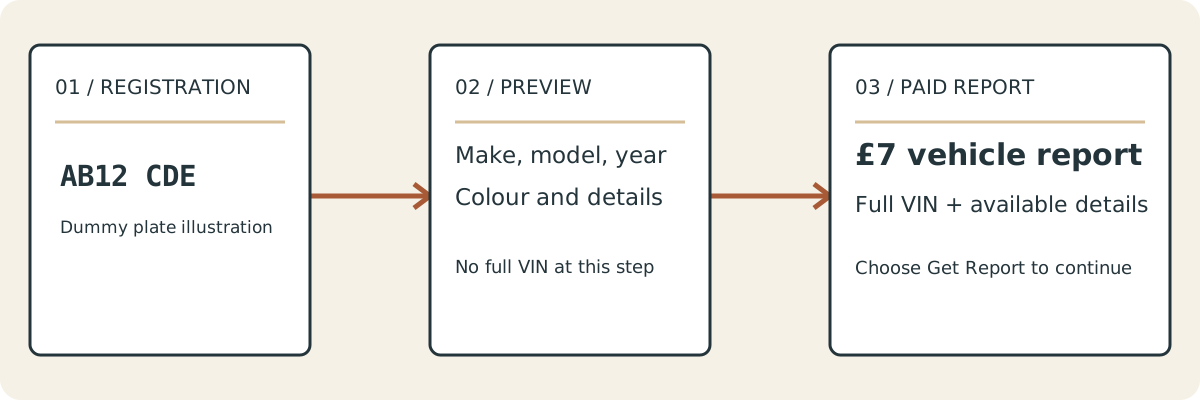
Begin with the number plate
Enter the UK registration exactly as it appears on the car or your documents. You can include the space or leave it out. Check letters and numbers carefully, particularly if you are reading from a photograph or an advert.
Choose Check this vehicle. This starts the real vehicle lookup, not a demonstration or a simulated VIN decoder. The form asks for a registration, not a VIN. You do not need to know the vehicle identification number to use it.
Look at the vehicle, not just the plate
The next screen asks Is this your vehicle? Compare the make, model, year and colour with the car you mean. Other available fields can help, including fuel, transmission, body type and engine details.
A registration transfer or recent record change may require extra care. If the description seems wrong, do not assume the report will fix it. Go back, re-enter the registration and check the details. Contact us if you still cannot identify the correct vehicle. Missing information should be displayed as unavailable rather than treated as a confirmed fact.
Decide whether you need the paid report
The preview does not reveal the full VIN. If you already have the number on the vehicle or its V5C, you may not need a paid lookup. Our VIN location guide can help you find it.
If you want the full VIN with the available vehicle information, choose Request the £7 report, priced at £7 GBP. You enter the delivery email after this choice. Check the email carefully before submitting your request, as it is where the report will be sent.
Put the report beside the paperwork
When the report arrives, compare the VIN character by character with the vehicle and V5C. Check the description too. A matching make or colour alone is not enough to confirm every detail.
You can use the report for parts enquiries, insurance administration, your own vehicle records or checks on a car you can inspect before buying. An estimated mileage figure should stay labelled as an estimate. A previous keeper count does not identify those people. MOT expiry does not replace the official MOT history service or a condition inspection.
If the lookup cannot find a vehicle
Check the registration and try again. Some vehicle records may be incomplete or unavailable. Do not change the registration to a similar-looking plate just to obtain a result. If you need help, send the registration and a short explanation through contact. Do not send payment card details or copies of private documents.
A temporary lookup error is different from a confirmed no-result response. The page should tell you which has happened, let you retry when appropriate and keep payment separate from the initial lookup.
Questions about this page
When do I give my email address?
After you select Request the £7 report for £7. The email field is not part of the initial registration preview.
What if the vehicle description is wrong?
Do not continue with your request. Check the registration, try again and contact support if the description still does not match.